

The Problem: Why was Alfred even needed?
Being in SRE means you get comfortable with one thing above everything else: being woken up at 2 AM 🥲
Most of the time, the problem wasn’t that deeply hidden. A few minutes in the logs, a quick look at traces, and you’d have your answer. But “a few minutes” is relative when you’re half-asleep, switching between Grafana dashboards, OpenSearch, and Jaeger, trying to figure out which of the hundred signals in front of you actually matters.
The real cost wasn’t the hard incidents. It was the easy ones that ate time — not because they were complicated, but because debugging is fundamentally a searching problem. You have all the data. Finding the right slice of it is the work.
On-call engineers would take the first pass. Only if they were stuck would it escalate to the DevOps team. That handoff had latency, context loss, and a low ceiling on how fast any single person could move through the observability stack.
We’d already experimented with giving Claude access to OpenSearch log data via MCP, with built-in sanitisation. It worked. But we wanted to use Gemini, and around that time, something called Open-Claw was making the rounds, and people were genuinely worried that AI would replace engineers. I was handed this project, and I’ll be honest: I wanted to prove the paranoia right. Not about replacing engineers, but about what was actually possible.
I went through names. Bobby, Anton, Namma Copilot, before landing on Alfred. Because even Batman needed one.
The Tool Stack
Alfred doesn’t query dashboards. It doesn’t parse Slack alerts and hope someone left a runbook. It talks directly to the raw data, at query time, across four observability backends and a production cluster. Here’s what that looks like under the hood.
Architecture: Two Layers, One Surface
The Observability Surface - MCP Proxy
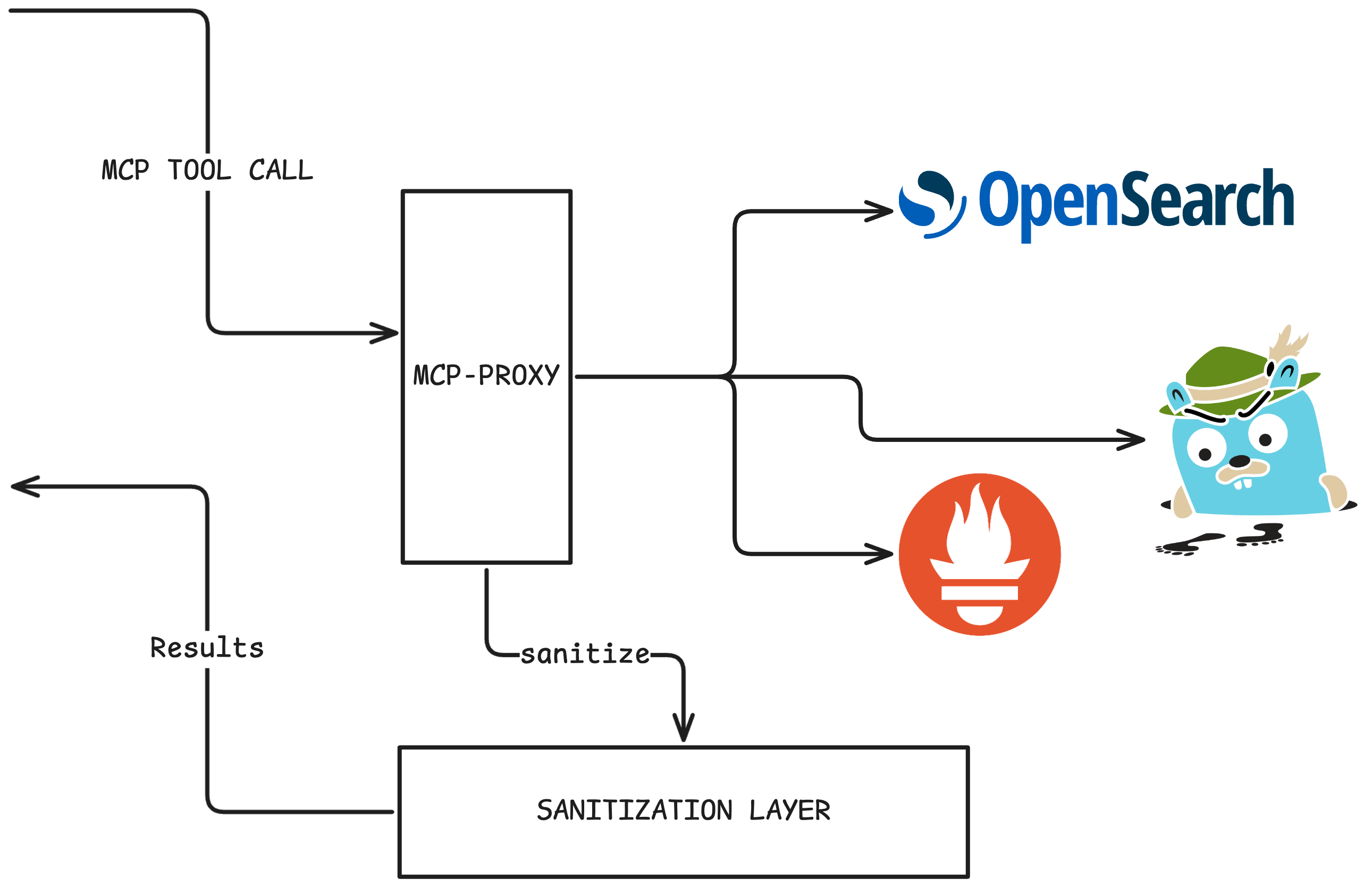
mcp-proxy is the core tool server. Prometheus, OpenSearch, Jaeger, and GitHub are each mounted as independent FastMCP modules with explicit namespaces. Alfred talks directly to it.
Prometheus: Write and execute raw PromQL — instant queries, range queries, label discovery, metric metadata. No dashboards, no pre-built panels. Alfred constructs the query itself.
OpenSearch: Full Query DSL across every prod log index, scoped to a namespace or service. Index inspection, cluster health, text analysis.
Jaeger: Trace search by service, operation, duration, or error tag. Full span-level detail, per-service timing breakdowns, live service dependency graph. When something is slow, Alfred finds where the time went.
GitHub: Read issues and PRs freely. Write operations, such as creating issues or comments, require human approval in Slack.
Shell Access
Knowing what’s broken is half the job. Alfred needed to run queries, inspect cluster state, tail live logs, and dig into data that lives outside the observability stack. That meant a shell. And giving an AI a shell on a production cluster is exactly as interesting a security problem as it sounds.
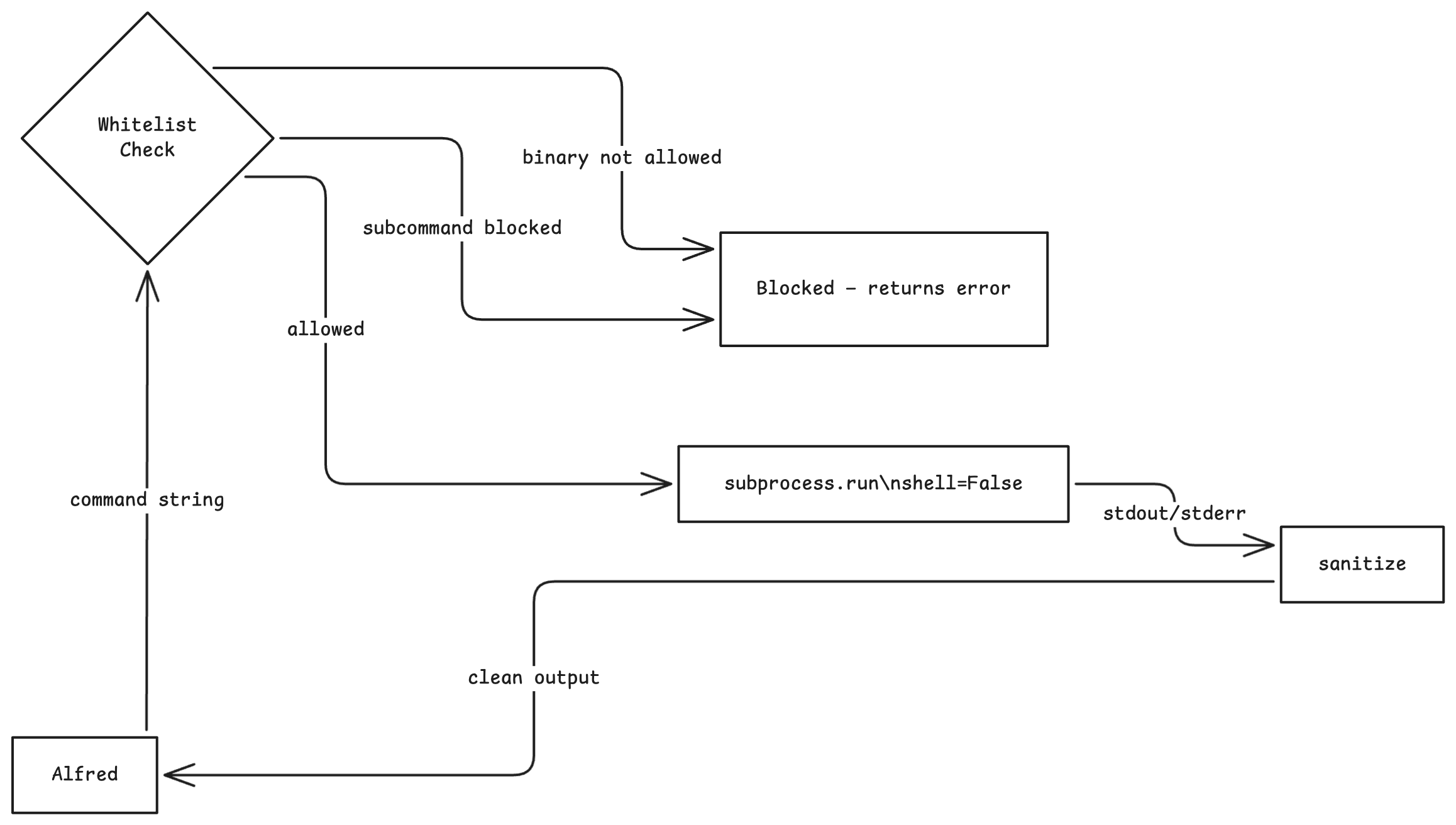
The original design was simple: shell=True, run commands, done. That lasts until you think about it for five minutes.
shell=True In Python, you hand your command string directly to /bin/sh. That means curl | bash.
It means,
kubectl get pods && cat /var/run/secrets/kubernetes.io/serviceaccount/token :(PATH poisoning, background processes, redirects, subshells. You haven’t given Alfred a tool — you’ve given him a terminal with production credentials!!
So we rebuilt it around shell=False. In Python’s subprocess.run, shell=False bypasses the shell entirely — the command string is parsed into an argv list by shlex.split and handed directly to the OS. There is no shell process, no environment expansion, no pipe interpretation. curl | bash It isn’t dangerous anymore. It’s a syntax error in the argv parser.
And on top of it, the access,

Alfred can inspect Kubernetes clusters, query ClickHouse, tail pod logs with stern, and read files it's been explicitly given access to. It cannot do anything else. Alfred can read, list, find, and grep files using tools built with Python only on directories Alfred is allowed to search and read, i.e, /research and /scratch
All the security implementation is done in code, not using prompts that plead “please, don’t delete anything.”
Knowledge: swym knowledge + qmd
The third server gives Alfred a semantic search over Swym’s internal systemic-knowledge repo — architecture diagrams, incident postmortems, operational runbooks, data flow docs. Before Alfred touches a single tool on any non-trivial task, it runs two lookups in parallel:
find_skills(query) | | qmd.query(lex + vec)
QMD by Tobi Lutke is a mini CLI search engine that runs entirely on your local machine, designed to search your personal docs, notes, meeting transcripts, and knowledge bases. It has 16.5k stars on GitHub, which speaks to how useful people find it.
What makes it stand out is that it combines three search techniques under the hood: BM25 full-text search for fast keyword matching, vector semantic search for finding meaning rather than exact words, and LLM re-ranking to sort results by true relevance. All of this runs locally using GGUF models, so nothing ever leaves your device.
It also exposes an MCP server, meaning you can connect it directly to Claude or other AI agents and give them access to your local documents when answering questions. This makes it a powerful tool for agentic workflows.
qmd collection add ~/notes --name notes
qmd embed
qmd query "what did we decide about the API design?"
Skills give the procedure. Knowledge gives the context.
The interesting engineering is in the deployment. qmd binds to 127.0.0.1 by design, built for local use, not Kubernetes pod-to-pod traffic. Rather than fork the binary, we added an nginx sidecar: nginx owns 0.0.0.0:3333 and proxies to qmd on 127.0.0.1:3334. The right call was to not touch QMD’s code at all. Solve the networking problem at the infrastructure layer, keep the third-party binary clean.
Cold start pulls ~2GB of GGUF embedding models once and caches them to a PVC. Every restart after that is warm. The repo syncs every 10 minutes using an incremental, mtime-based process with no full rebuilds required.
Cold means the model needs to be downloaded and does not already exist on disk, which would take a long time. Warm means that it exists on disk and I don’t have to re-download it.

The Redaction Layer
Every response from every tool passes through a middleware layer before Alfred sees it. No per-tool configuration, no code changes needed. To add redaction for a new tool, add its namespace prefix to a list. By extracting the source namespace from tool names like opensearch_search_documents and jaeger_get_trace, the mechanism determines if the source requires sanitization and strips sensitive data in-flight. Alfred receives a clean response. The raw data never travels further than it needs to.
The sanitisation logic lives in one place: commonlib/sanitize.py, a shared package mounted as a dependency across every service. mcp-proxy uses it in the redaction middleware. shell-access applies it directly to the subprocess output. jaeger_tools.py calls it inline on span tags and log fields before they even leave the tool. One source of truth. No duplicated patterns, no diverging redaction rules across services. Every service (mcp-proxy, shell-access, core, slack-integration) imports the same package. One place to update a redaction pattern. No risk of one service leaking what another strips.
An LLM that can read your database connection strings and also write GitHub issues is a different threat model entirely. The redaction layer is why Alfred can have broad access to tools without it becoming a liability.
MCP-Gateway: Engineers Get This Too
Engineers have direct access through mcp-gateway to every tool Alfred uses, including Prometheus, OpenSearch, Jaeger, GitHub, shell access, and qmd. It’s a thin FastMCP aggregator, proxied through Teleport (a popular reverse proxy software), that fronts all three backend servers behind a single MCP endpoint. Claude Code and Copilot connect here. Adding a new backend is one line in a config file. No restarts, no code changes.
Flow of a Query
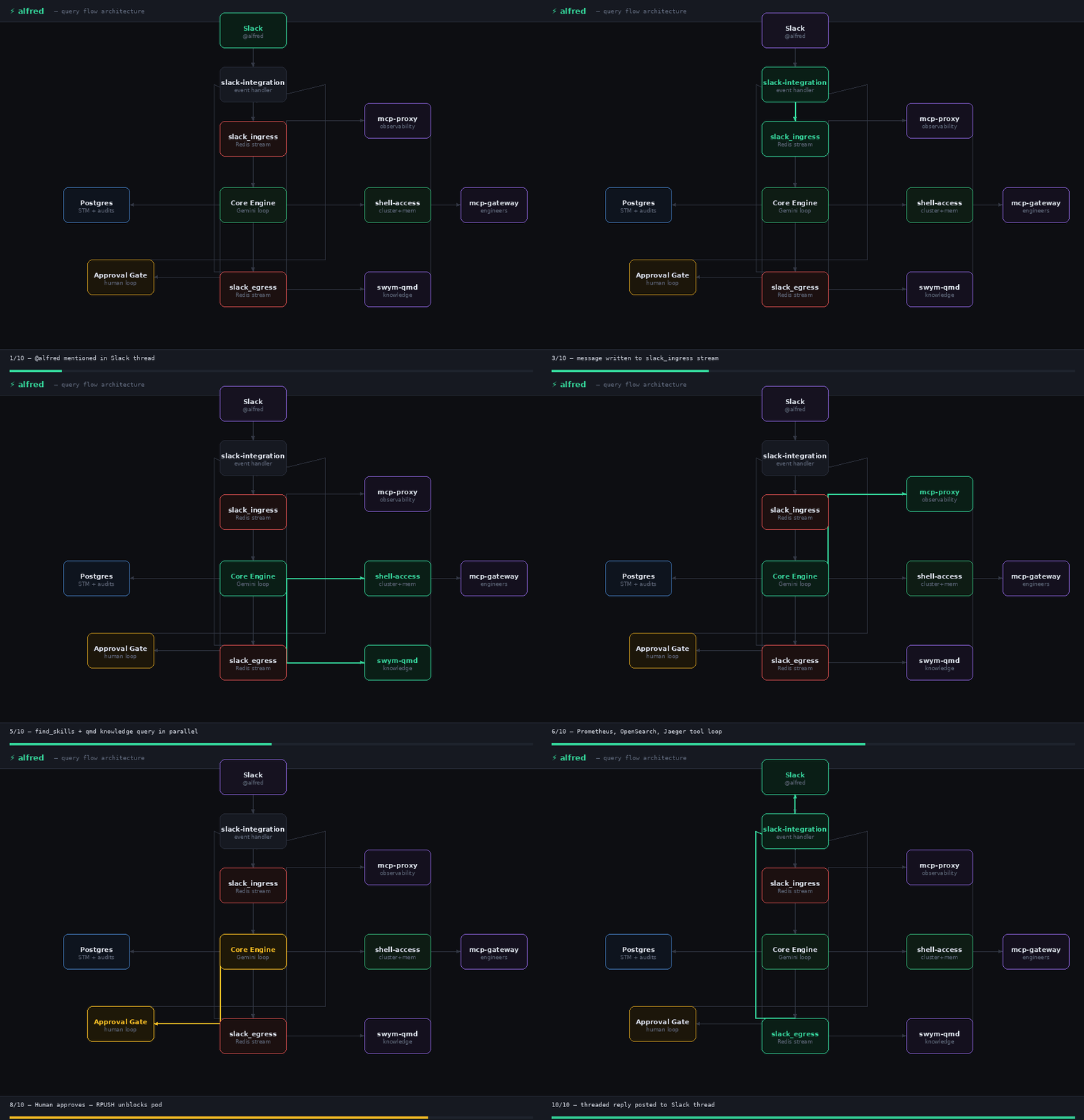
When you mention Alfred in Slack, a lot happens before you see a reply. Here’s the full lifecycle.
Why Gemini and Slack
Alfred runs on Gemini. Swym has data usage contracts with Google, and because Google has a better chance of surviving the current AI landscape than most. Model choice isn’t always a technical decision. Gemini also offered better usage limits and a per-million-tokens cost, even for its best models.
The interface choice was never really a choice. Swym runs on Slack. Incidents get reported there, and engineers are already watching it. A separate UI would’ve meant one more thing to open at 2 AM. Slack meant Alfred lived where the conversation already was.
Step 1: The Message Arrives
The Slack message hits slack-integration and gets written to the slack_ingress Redis stream, and is picked up by whichever core pod wins the consumer group race. Session identity is derived immediately: SHA256(channel_id + thread_ts). Every message in the same Slack thread maps to the same session, regardless of which pod handles it.
If the session already has an active task running, the new message gets queued. Alfred processes one task per session, strictly in order, with no interleaving.
Why Slack Threads? A Slack thread is already a conversation, inherently dedicated to a single incident, question, or moment. Alfred treats it exactly that way. The conversation boundary was already there; Alfred just respects it.
Why Session IDs? Any pod can handle any session. Redis streams deliver each message to exactly one consumer, meaning Alfred gets horizontal scaling for free without needing to build custom load balancing.
Step 2: Memory Merge
Before Gemini sees anything, Alfred loads the session’s conversation history from Postgres (STM - Short Term Memory) and merges it with the incoming messages, deduplicating by Slack ts. When the full history exceeds 800K tokens, it is compacted by dropping the oldest messages first. Alfred then builds the system prompt from assembled prompt files and opens the Gemini chat session.
Alfred also has a second memory tier: LTM (Long-Term Memory), stored as Markdown files on the shell-access pod and exposed as MCP tools. Unlike STM, which is automatic, LTM is deliberate. Alfred writes to it when it learns something worth keeping across sessions, and queries it during the pre-task routine. Consequently, insights such as a fix that worked, a recurring pattern, or a user preference survive beyond the conversation.
STM is what happened in this thread. LTM is what Alfred has learned from every thread.
Step 3: The First Gemini Call
The user’s message goes to Gemini. Gemini’s first response almost always includes tool calls. This is by design. The system prompt mandates a silent pre-task routine before Alfred responds to anything:
find_skills(keyword)— search for a matching playbook. If one matchesread_skill(name)and follows it exactly. Skills are canonical procedures, not suggestions.For any non-trivial task — incident, investigation, performance issue —
querythe knowledge base with both lexical and vector sub-queries, in parallel with the skills lookup.Check long-term memory if relevant.
Skills follow Claude Code’s native format, utilising the exact SKILL.MD structure found in Claude Code. That means any skill written for Claude Code works for Alfred out of the box, and the skills engineers write for Alfred can be used by Claude Code, too. One format, two agents, shared playbook library.
Alfred doesn’t decide whether to do this. The prompt requires it. Skills give the procedure. Knowledge gives the context. LTM surfaces anything Alfred has learned from previous sessions. All three fire before Alfred touches a single observability tool.
Step 4: The Tool Loop
Once the pre-task lookups are complete, Alfred enters the agentic loop. Gemini issues tool calls. Alfred executes them, feeds results back, and gets the next response. This continues until Gemini stops issuing tool calls or the iteration limit (30) is hit.
Two rules govern execution:
Read-only tools run in parallel —
asyncio.gatheracross all concurrent readsMutating tools run serially — one at a time, in order, after all reads complete
Every N iterations (configurable), a one-shot Gemini Flash call summarises the pending tool calls and posts an italicised status line to Slack. For long-running investigations, the user isn’t staring at a spinner but rather watches Alfred’s working notes update in real time.
If an approval-gated tool comes up — github_create_issue, github_comment_on_issue — The loop pauses. Alfred posts a Slack message with Approve/Deny buttons and blocks on a Redis key.
Step 5: The Reply
When Gemini returns a text response with no further tool calls, Alfred posts it to Slack, appends it to STM, and increments the session token counter. If the response is empty, which happens occasionally, Alfred nudges Gemini with a summarisation prompt up to four times with linear backoff (1s, 2s, 3s, 4s) before giving up.
The session stays alive. The next message in the thread picks up exactly where this one left off.
Steering Commands
Users can intervene mid-flight:
!interrupt : Cancels the active task and clears the entire queue for this session.
!interrupt-one : Cancels only the active task; queued messages still run
!tokens : Reports total token usage for this session
Approvals for Alfred
Alfred can write to GitHub to open issues and leave comments. Early on, it could do that freely. It didn’t take long to find out why that was a problem: Alfred raised two GitHub issues that nobody asked for. Far from malicious or buggy, it was just a confident agent that had the tools and decided to use them.
That was the moment we added the approval gate.
Now, before Alfred touches anything that can’t be undone, it stops and asks. It posts a message to Slack explaining what it’s about to do in plain English, rather than using tool names and arguments, along with two buttons: Approve and Deny. Alfred waits. A human clicks. Only then does it proceed.
If nobody clicks within 5 minutes, it auto-denies and moves on.
Every decision is logged, capturing what the tool was, what it was going to do, who approved or denied it, and when. The audit trail is permanent.
One thing worth calling out: waiting for approval only pauses that one conversation. Every other engineer talking to Alfred in a different thread continues unaffected. Rather than freezing while it waits for a human, Alfred simply sets that one session aside until someone responds.
What’s Next?
Alfred is in production. It handles real incidents, triages real alarms, and has already paid for itself, specifically by surfacing codebase inefficiencies that led to meaningful cost reductions. What started as a 2 AM problem is now second nature for everyone at Swym. Engineers don’t open Grafana first anymore. They ask Alfred.
The next frontier is turning that inward. Alfred has full visibility into production, yet we have no visibility into Alfred. We’re building observability for Alfred itself: tracing every query, measuring response quality, understanding where it gets stuck, and why. An agent that investigates your infrastructure should be just as observable as the infrastructure it investigates.
There’s more on the roadmap, including semantic LTM, tighter shell controls, and broader tool coverage. But the foundation is solid. Alfred is pulling more than its weight, and we’re only getting started.
At Swym, we don’t wait for AI to mature before we use it. We build with it, ship it to production, and iterate. Alfred is the proof of what that looks like when you take it seriously.
Wow, really nice! What all other agents like Alfred do you have or are thinking of adding into your workflows?