

I built a Storefront Agent that spins up a real Chrome browser, browses and debugs live Shopify storefronts, and streams results over WebSockets. When I deployed it to production on Kubernetes, it worked perfectly. Until it didn’t.
The failure was bizarre from the outside. Someone would trigger an agent run from the dashboard. The agent would start. Then the WebSocket connection would fail. Sometimes a retry worked. Sometimes it took three tries. No consistent pattern. No obvious error in the code. Mind you, the agent was actually continuing to run in the background, it was the WebSocket connection that was failing.
Here is what was actually happening.
My naive assumption
I had worked with REST APIs a lot. This was my first time shipping something over WebSockets, and I naively assumed it would behave the same way. I had never had to think about how K8s (Kubernetes) routes traffic because REST just works. That changed the moment I used WebSockets.
The reason REST “just works” is that every REST request is stateless. It doesn’t matter which pod handles it because no pod holds any memory of the previous request. Kubernetes can round-robin requests across every pod in your deployment and everything is fine.
WebSockets are fundamentally different. The connection stays open for the entire lifetime of the agent run. And the state it needs -- a live Chrome process -- exists on exactly one pod. So the connection has to reach that pod
Here is what was happening on every failure:
POST /agents/run  →  Pod A  ← Chrome starts here, run state stored here
WS   /agents/ws   →  Pod B  ← Kubernetes round-robins here
                              Pod B: "Run not found" → connection fails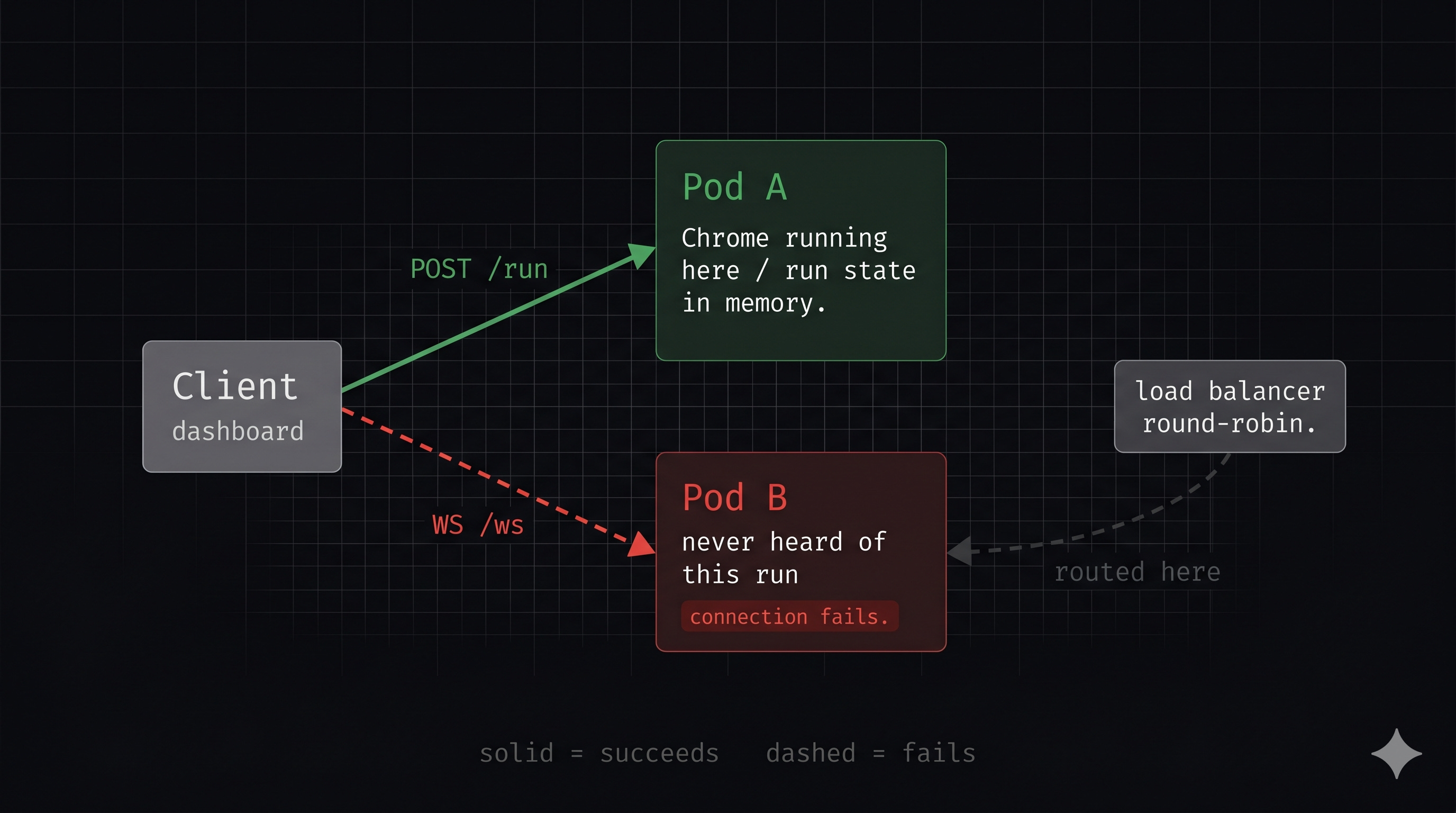
The POST request that starts the run lands on Pod A. Pod A spins up Chrome, starts the agent orchestrator, and stores the run state in memory. Then the WebSocket connection comes in and Kubernetes routes it to Pod B. Pod B has never heard of this run. Connection fails.
That is the entire problem. REST is stateless so it does not care which pod it hits. My agent is not stateless because Chrome is running on exactly one pod.
One more thing worth noting here: my WebSocket client was not a browser. It was another backend service that then forwarded the stream to its own frontend. This matters because one of the first solutions I looked at (cookie-based sticky sessions) relies on a browser faithfully replaying cookies on every request. A backend service does not do that reliably. So that option was out immediately.
The amplification loop I did not see coming
Here is the part that made this genuinely painful to debug.
Chrome is heavy. A single browser session eats serious memory. When multiple agent runs were in flight simultaneously (some user-triggered, some fired by automated business events) the memory pressure caused Kubernetes HPA (Horizontal Pod Autoscaler) to spin up additional pods.
More pods means the probability of a WebSocket connection landing on the wrong pod goes up. More concurrent runs means more Chrome processes means more memory pressure means more pods. The failure rate was climbing as load increased and I had no idea why. I was watching the dashboard break worse under pressure without connecting it to pod count at all.
Once I understood that, the problem was obvious. But getting there took a bit longer than I’d like to admit.
I just had to make sure the WebSocket connection was routed to the pod running the live Chrome process. That’s it. Simple to say, surprisingly annoying to actually solve.
Solutions I actually considered
I want to walk through every option I evaluated, because the list of rejected solutions is where the real learning is.
A quick note if you haven’t had to think about this layer before
A load balancer sits in front of your pods and decides which pod handles each incoming request. In Kubernetes, this is typically nginx or a managed cloud load balancer like Azure Application Gateway. By default it distributes requests evenly across pods round-robin. Everything below assumes this basic picture.
Cookie-based sticky sessions (rejected immediately)
When sticky sessions are enabled, the load balancer sets a cookie on the first response it sends back to the client (not in the browser, not on the server, but at the load balancer itself). From that point on, whenever that client makes a request, the load balancer reads the cookie and sends it to the same pod every time.
Sounds perfect. Two reasons it didn’t work here.
First: my WebSocket client was a backend service, not a browser. Browsers are designed to store and replay cookies automatically on every request. Backend services are not. Therefore, there is no guarantee the service preserves and resends that cookie. So the stickiness breaks.
Second, and this one is worth reading slowly: if my dashboard service ran only one client pod, every single WebSocket connection from that pod would be pinned to the same agent pod. All traffic, always, to one pod. The HPA could spin up ten pods under load and nine of them would sit idle while one gets hammered. The autoscaling is completely defeated.
Notice these are opposite failure modes. If the cookie is not preserved, stickiness never forms. If it is preserved, all traffic from one client pod pins to a single agent pod. Either way, the approach fails.
nginx consistent hash (rejected, but not obviously)
When I hit this problem I did what most engineers do, asked an AI assistant for the standard solution. Copilot gave me nginx consistent hash routing. It is technically the correct answer for this class of problem — routing a persistent connection to the same backend every time.
Here is how it works: instead of “round-robining” blindly, nginx can hash on a key you provide. Give it a run ID, it deterministically sends that request to the same pod every time. No randomness, no wrong pod.
The specific version that works for this problem: the client generates a UUID before calling POST to start the agent run and passes it as ?run_id=<uuid> in the query string. nginx extracts that same UUID from both the POST query param and the WebSocket URL path, hashes on it, and both requests land on the same pod. Perfectly even load distribution. Works at any replica count. No shared state needed.
I spent real time on this. It is a clean solution.
Then I found out it only works on staging.
Production uses Azure Application Gateway, a managed load balancer from Azure that sits in front of the cluster. AppGW handles SSL termination, routing, health checks, and more at the infra level. Unlike nginx, it does not support the upstream-hash-by annotation that makes consistent hash routing work. The feature simply does not exist on AppGW.
The answer was sitting in my own Helm chart the whole time. I had given Copilot the staging config but not the production one. It gave me the correct solution for the environment I showed it. I just hadn’t shown it the full picture.
Redis Pub/Sub with a namespace-local deployment (chosen)
Once nginx was off the table, the answer got simple fast.
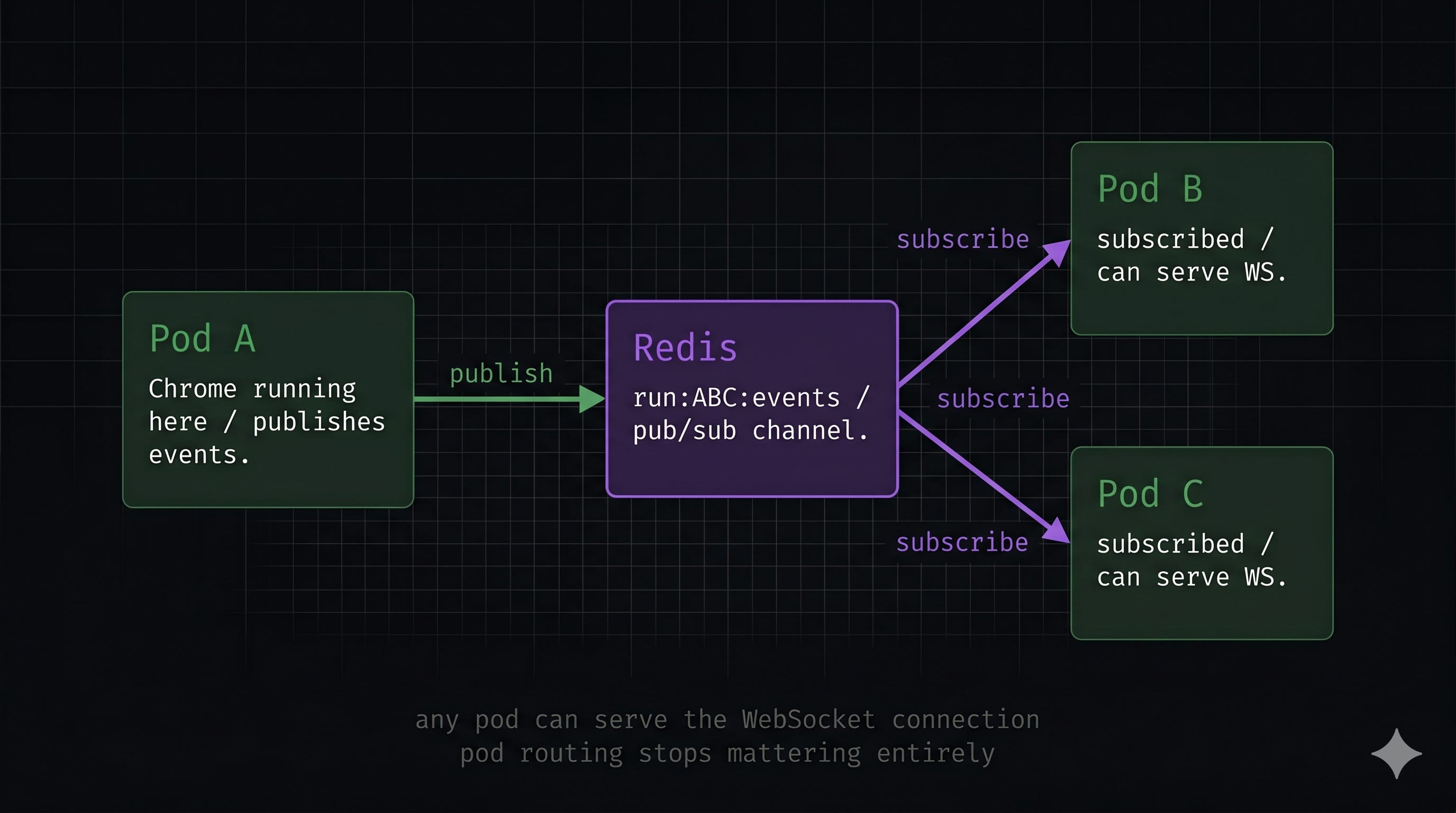
The core insight is: instead of trying to route the WebSocket connection to the right pod, let any pod serve it. The pod running the agent publishes every event to a Redis channel. Any pod (whichever one the WebSocket connection lands on) subscribes to that channel and forwards events to the client. Pod routing stops mattering entirely.
I spun up a Redis instance as a separate deployment in the same Kubernetes namespace as my service. Not the shared Redis used elsewhere in the platform -- its own dedicated pod, completely independent, right next to my service.
This is literally all I added to my Helm chart:
extraManifests:
  - |
    apiVersion: apps/v1
    kind: Deployment
    metadata:
      name: storefront-agent-redis
      namespace: platform
    spec:
      replicas: 1
      selector:
        matchLabels:
          app: storefront-agent-redis
      template:
        metadata:
          labels:
            app: storefront-agent-redis
        spec:
          containers:
            - name: storefront-agent-redis
              image: redis:7-alpine
              command:
                - redis-server
                - --maxmemory
                - 200mb
                - --maxmemory-policy
                - noeviction
              ports:
                - containerPort: 6379
              resources:
                requests:
                  cpu: 100m
                  memory: 128Mi
                limits:
                  cpu: 250m
                  memory: 256Mi
              volumeMounts:
                - name: storefront-agent-redis-data
                  mountPath: /data
          volumes:
            - name: storefront-agent-redis-data
              emptyDir: {}
  - |
    apiVersion: v1
    kind: Service
    metadata:
      name: storefront-agent-redis
      namespace: platform
    spec:
      selector:
        app: storefront-agent-redis
      ports:
        - port: 6379
          targetPort: 6379
I will be honest: I do not fully understand every line of that YAML. But I do understand the nature of the solution and why the specific choices were made.
One thing worth understanding about Pub/Sub: Redis does not store these messages anywhere. When the agent pod calls publish, Redis finds all active subscribers on that channel and delivers the message immediately. Then it is gone — no key, no buffer, no replay. If a subscriber is not connected at that exact moment, the message is dropped. This is why emptyDir is fine: there is nothing durable to lose. MongoDB holds the real run state. The only thing Redis is doing here is wiring together a publisher and subscriber that might be on different pods.
MongoDB holds the real durable state for completed runs. Losing Redis mid-run means losing the in-flight WebSocket connection, but the run itself survives in MongoDB and can be retried.
One implementation detail worth keeping: I did not rip out the existing local queue. If the WebSocket connection happens to land on the same pod running the agent, events flow through the local queue directly, no Redis round-trip, lower latency. Redis is only used when the connection lands on a different pod. The fast path stays fast. Before this, a WebSocket landing on the wrong pod simply failed. Now it works regardless of which pod it hits.
Why this matters beyond the immediate fix
Here is a bonus I did not plan for. Future versions of this agent will need to pause mid-run and wait for a human to make a decision before continuing. That only works if the agent’s state is somewhere any pod can reach, not locked inside one pod’s memory.
By solving the WebSocket routing problem, that foundation is already in place. The event wiring is now pod-independent, and durable run state already lives in MongoDB, so the pieces for a future human-in-the-loop pause are mostly in place. Sometimes you get lucky.
The honest summary
The Redis implementation was done in a jiffy, once I knew what to build. The hard part was before that - watching non-deterministic failures, not knowing whether the problem was in the agent logic or the infrastructure, chasing the nginx solution because I did not know my own prod environment well enough to catch the mismatch.
Turns out it was the infrastructure. Probably worth understanding that layer before you need to debug it at 11pm.
Still figuring a lot of this out. If you’ve solved problems like this differently, I’d genuinely love to know. X or LinkedIn.