

Note from the Author
This document reflects my perspective on how we built and enabled the capability, not really a how-to-use. If you are looking to try it out or looking for our product documentation or support features, our web portal is the best place to start or try our app on your store.
There’s a silent conversation happening on every storefront, every single day.
It’s the moment a shopper hovers over an item, pauses, and clicks that heart button. They aren’t ready to buy - not yet - but they’ve just raised their hand. They’ve signaled intent.
For years, we at Swym have tracked this social proof (the number of times a product is added to a wishlist) and enabled access via APIs. We knew which products were simmering just below the surface of a “Best Seller” list. Quite a few merchants leveraged it but not without limitations. Eg: a product details page will show just one product’s social proof, but a collection page needs to show all products in that all collection. That meant there were more API calls to pull and render it. Plus this wasn’t easily available to build customizations that are directly connected to the catalog filtering. It was a “Swym capability,” not a entirely general “Storefront reality.”
By making this nugget available on Shopify Product Metafields, it makes many use cases previously complicated to a simpler usage pattern and not compromised based on the implementation philosophy (if you know Shopify, you know there are infinite options to implement the same thing and usually most of them don’t end up with efficiency and speed goals the implementation starts with)
Start with why
Like usual, we start with why. So let me dive a bit deeper
Ecommerce business philosophy is somewhat obsessed with “Best Sellers.” It’s one of the loudest metric out there. But sales data only tells us what happened yesterday.
The Wishlist Social Proof (aka Wishlist Social Count) tells us what is going to happen tomorrow. By syncing this intent data point natively into Shopify Metafields, this a way to listen to the Most Desired products - the ones that are trending in the hearts of shoppers before they get to the checkout line eventually.
Why should Shopify Native matter?
This is something that needs context more than technicality. So when we sat down to build this, we had plenty of merchants leveraging this social proof in their experience flows. But it was nowhere straightforward. Clearly we need to multiple the craft of the modern developer, not add more complexities
By pushing into a metafield, we’ve enabled access to the data from an API call to a native Shopify attribute, ie it’s available where Shopify renders the rest of the ecommerce context that the merchant wants.
So it may not be obvious, but the answer goes far beyond just Storefront Efficiency (though that’s a huge part of it).
Render at Liquid speed: Think of the metafield as an extended edge cache for the Swym API (ie render first, refresh later if needed). So by storing these values directly on the Shopify Product object, the storefront load doesn’t have to make any additional API call to finish rendering.
eg: Reference to the social count directly on a Liquid theme file{{ product.metafields.swym_wishlist.wishlist_social_count }}
This is critical for rendering social counts on Collection Pages where there may be 50+ products displayed at once. The result? No layout shift, no “loading” spinners, and zero impact to PageSpeed scores due to any missed implementation constraint. I am sure we don’t have to say this, but this is a huge dev experience lever.Native Automation: As the data point is available inside Shopify, it is accessible on tools like Shopify Flow. It opens up ideas we haven’t even thought about, like using a flow trigger workflow based on the change in soccial count of a product. eg: Do something cool when product.wishlist_social_count > 1000.
AI Readiness: I am sure pretty much every Shopify admin is already using Shopify Sidekick. So now that can also parse this “popularity” construct to help make better decisions, be it merchandising or support cool segments or widgets to the storefront experience.
The future - Seamless Ecosystem Enablement: This essentially normalizes access to Swym for theme developers, agencies, or other apps in the ecommerce tech stack (like search provider or loyalty program). This means the experiences are faster to build (low complexity), cheaper to maintain (we maintain it!), and require little to no API work.
The Technical “How-To”
We push the Social Count to our namespace to enable ease of use.
Using it in Liquid
Displaying this on Product Details Page (PDP) or Collection Page is now literally one Liquid render:
Sample Code snippet
{% if product.metafields.swym_wishlist.wishlist_social_count > 10 %}
  <span class="swym-wishlist-plus-badge">
    🔥 {{ product.metafields.swym_wishlist.wishlist_social_count }} people want this!
  </span>
{% endif %}
The Power of the TOML: Seamless Integration
Sure it’s easy to build something, but to deploy it at our scale (50K and growing) requires an equally reliable way to deploy and monitor. Not to mention to rollback if things go awry. So we leveraged Metafield Definitions directly within the app' TOML configuration. giving our silent tip of the hat to Shopify’s evolving dev experience.
With this incredible automation powered by the Shopify platform itself, it’s a big chunk off our todo-list. Literally, we pushed these standardized definitions to our all of those 50K+ merchants without a hitch.
It’s clean, it’s standardized and it’s simple.
[product.metafields.app.wishlist_social_count]
name = “Wishlist Social Count”
description = “The number of times this product has been added to a shopper’s wishlist”
type = “number_integer”
capabilities.admin_filterable = true
access.customer_account = “read”
access.storefront = “public_read”
access.admin = “merchant_read”
The above was the seemingly simple part, in the background we manage the scale per merchant per intent update through our systems. We deliberated on efficient ways on doing this sync. Here is a small brief on what we discussed
When’s the best time to sync a product?
What triggers should initiate a refresh?
What’s a good SLA?
How do we measure the above-mentioned SLA?
How do we “onboard” past social proof for existing scale?
This one is super tricky - How do we manage retries and rate limits? (both internal services and Shopify’s API rate limits)
Without going into the details, we have decisions and factors considered into it. We’ll reassess and upgrade our approach as we learn more or if factors change/new factors enter the picture
Intent proof finding voice
1. Automated Merchandising with Shopify Flow
Set up a workflow that monitors wishlist social counts. If a product’s social count hits a “Viral” threshold (For example, a social count value of 100), have Flow automatically add it to a “Trending Now” collection or tag it for a social media spotlight.
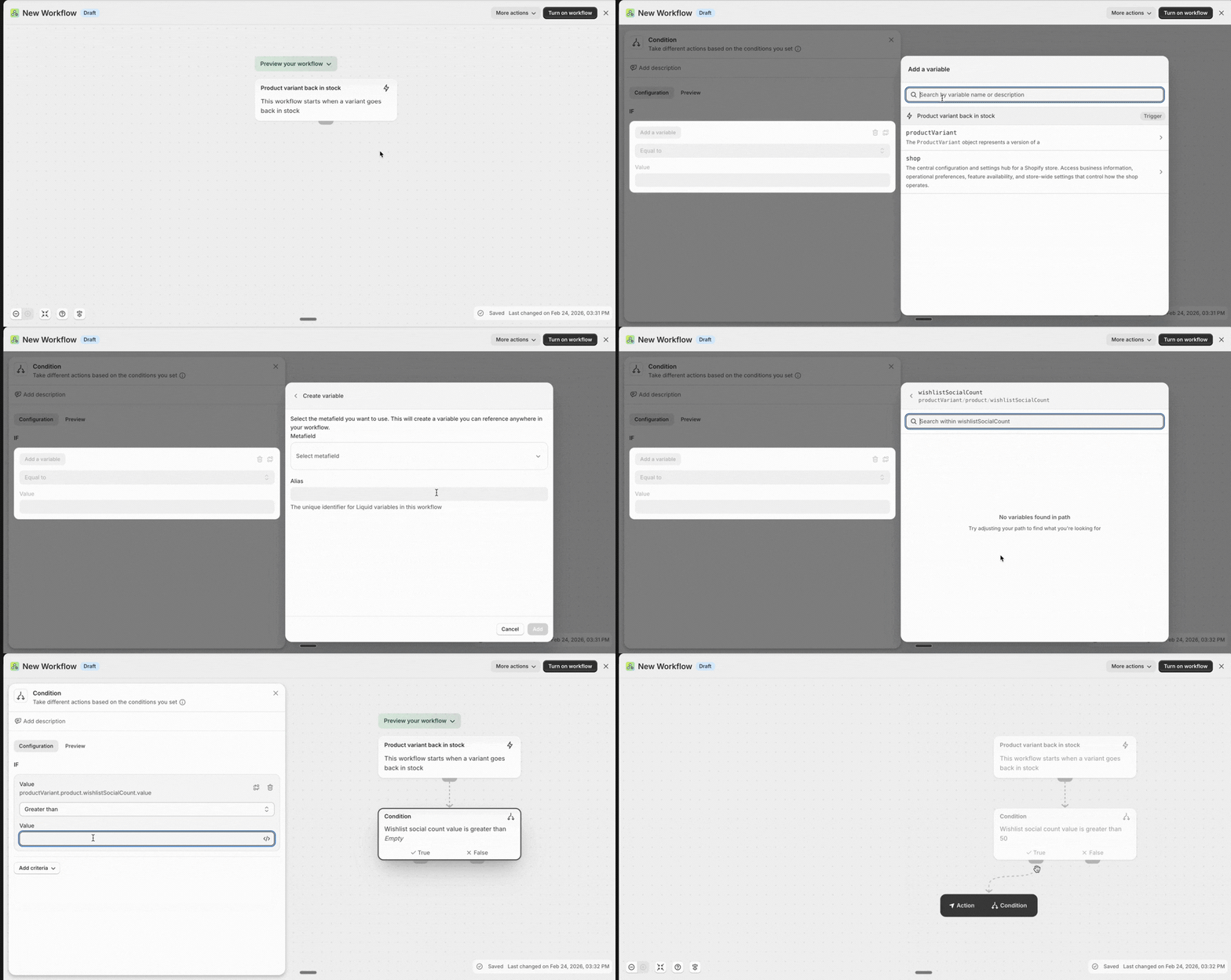
2. Automated Urgency with Shopify Flow
Imagine a workflow where, if a product’s Social Count hits 100 but inventory drops below 10, an automatic “High Demand” tag is added to the product.
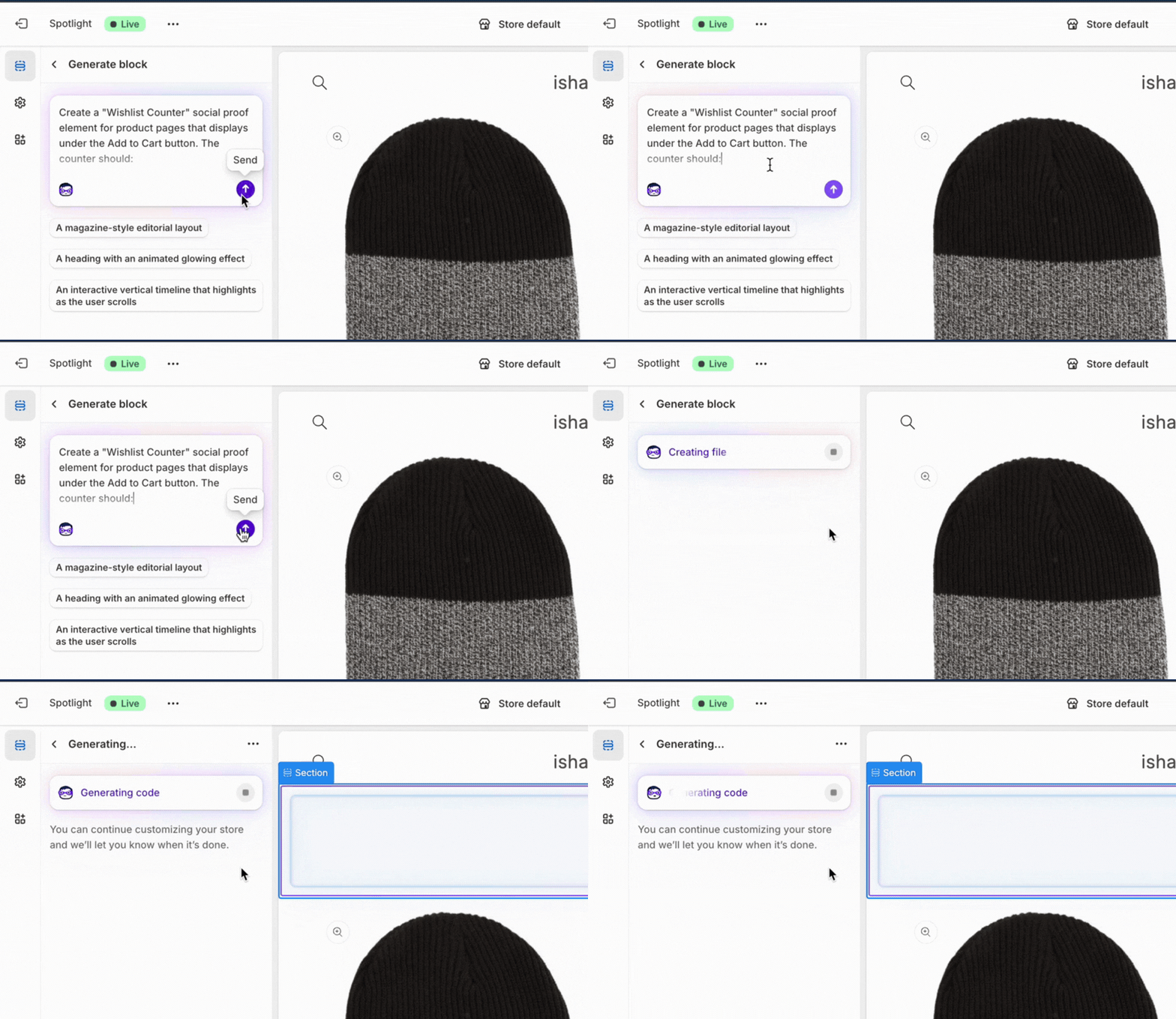
3. AI-Generated Badges with Sidekick
Use Shopify Sidekick to effortlessly design UI elements based on it, surface it any which way.
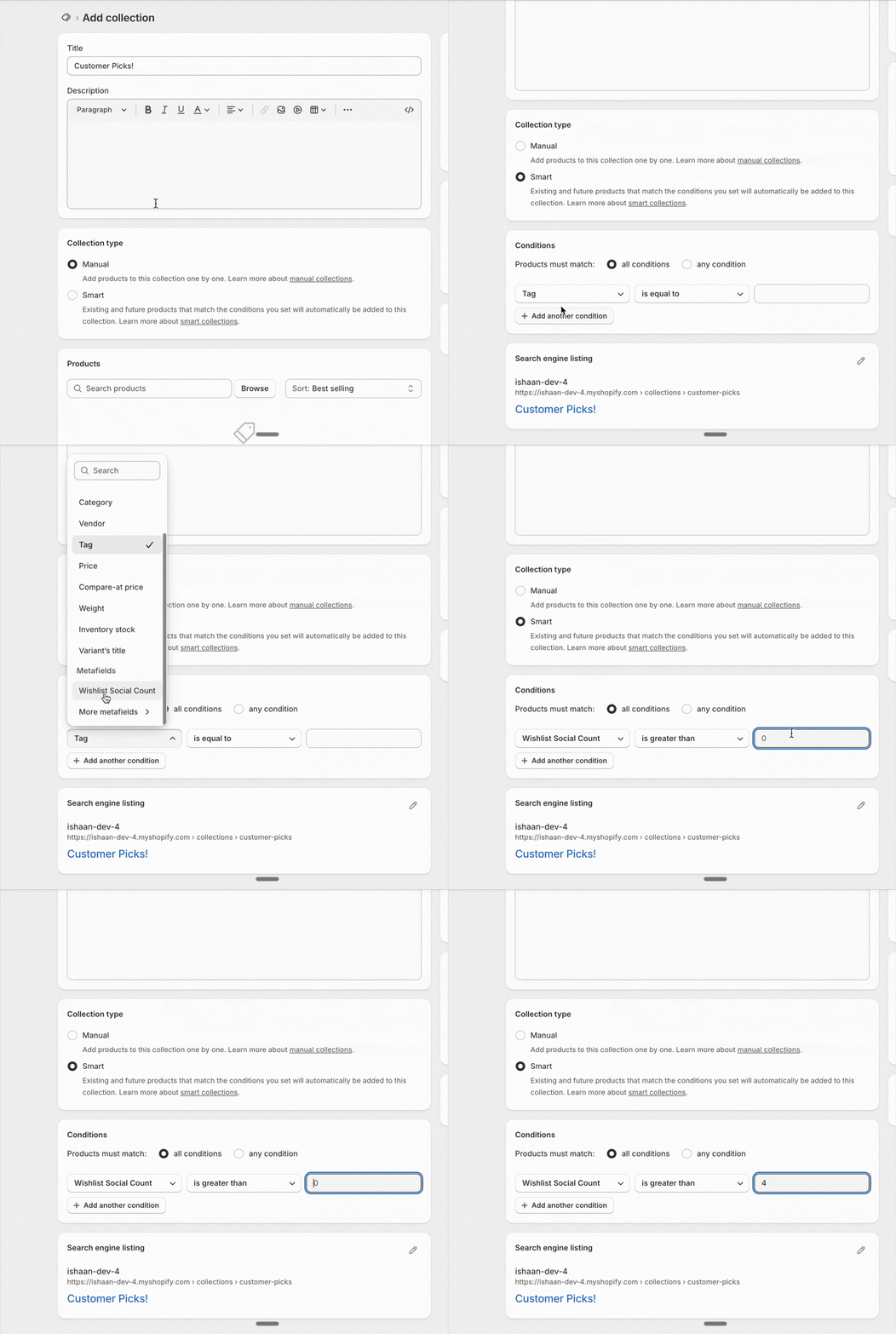
4. Collection Sort
Go beyond “Best Selling” or “Price: Low to High.” Create a “Most Wanted” sort option. This allows shoppers to filter the catalog by what the community is currently eyeing, creating a trend-driven shopping experience that feels real and alive.
The Heart of the Story
We didn’t enable this sync just to move numbers from point A to point B. We built it because we believe the most successful experiences are the ones that connect best products with the shoppers in the best way possible - ie the experiences that are best at listening to what the shopper “wants”.
We can see the crowd gathering from our end and now, so can our merchants and their shoppers as easily as we do.

P.S: Here is our product documentation again in case you want to try it out